Warranty Expiry Calculator with Leap Year Support

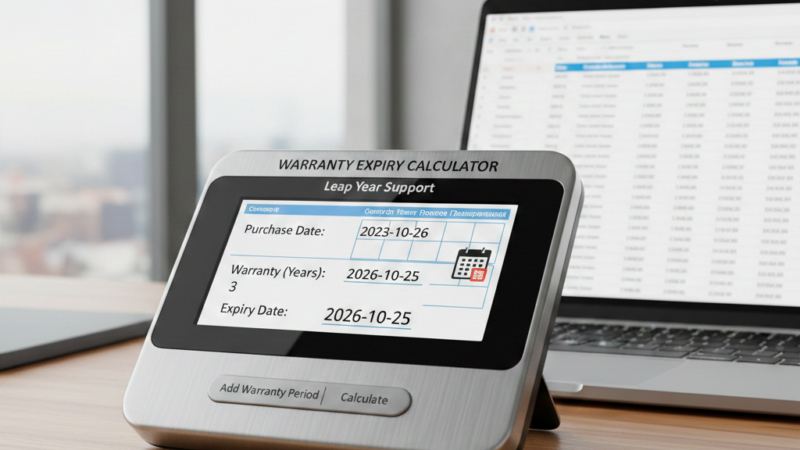
A Warranty Expiry Calculator is essential for accurately determining remaining warranty duration and expired status in business applications. Without a structured calculation model, simple day subtraction often produces inaccurate results. In particular, leap years, varying month lengths, and timezone differences can distort expiry calculations.
To solve this problem, a reliable Warranty Expiry Calculator must follow calendar-based logic rather than millisecond approximation. For example, February behaves differently during leap years, while months may contain 28, 29, 30, or 31 days. As a result, ignoring these variations leads to reporting inconsistencies and operational risk.
Moreover, enterprise systems require precise year, month, and day breakdowns instead of generic “days left” outputs. Therefore, the calculator should normalize time values, validate leap years explicitly, and correctly adjust month rollovers. In addition, expired durations must be calculated using the same calendar-aware logic to ensure consistency.
By implementing these principles, organizations can achieve accurate warranty tracking across multiple years. Consequently, financial reporting, compliance tracking, and service management processes remain dependable and error-free.
Why a Proper Warranty Expiry Calculator Matters
In enterprise environments, warranty tracking commonly appears in:
- Asset tracking applications
- Service management platforms
- Inventory dashboards
- Backend business systems
However, relying solely on millisecond-based calculations leads to several issues. For example, month boundaries may shift incorrectly, and February calculations may fail during leap years. In addition, timezone differences can introduce subtle yet critical errors.
Consequently, businesses need a deterministic, calendar-aware solution that guarantees precision across multiple years.
Understanding Leap Year in JavaScript
A year qualifies as a leap year when:
- It is divisible by 4
- It is not divisible by 100
- Unless it is divisible by 400
For example:
- 2024 → Leap Year
- 2025 → Not Leap Year
- 2000 → Leap Year
- 1900 → Not Leap Year
Although JavaScript’s Date object is calendar-aware, implementing explicit leap year validation improves clarity and ensures predictable enterprise behavior.
Production-Ready Warranty Expiry Formatter
Below is a leap-year-safe and timezone-normalized formatter:
formatWarrantyDuration: function (warrantyDate) {
    if (!warrantyDate) return "";

    const today = new Date();
    const expiry = new Date(warrantyDate);

    today.setHours(0, 0, 0, 0);
    expiry.setHours(0, 0, 0, 0);

    const isExpired = expiry < today;

    const start = isExpired ? expiry : today;
    const end = isExpired ? today : expiry;

    const isLeapYear = (year) => {
        return (year % 4 === 0 && year % 100 !== 0) || (year % 400 === 0);
    };

    let years = end.getFullYear() - start.getFullYear();
    let months = end.getMonth() - start.getMonth();
    let days = end.getDate() - start.getDate();

    if (days < 0) {
        months--;

        let prevMonth = end.getMonth() - 1;
        let prevYear = end.getFullYear();

        if (prevMonth < 0) {
            prevMonth = 11;
            prevYear--;
        }

        let daysInPrevMonth;

        if (prevMonth === 1) {
            daysInPrevMonth = isLeapYear(prevYear) ? 29 : 28;
        } else {
            daysInPrevMonth = new Date(prevYear, prevMonth + 1, 0).getDate();
        }

        days += daysInPrevMonth;
    }

    if (months < 0) {
        years--;
        months += 12;
    }

    let parts = [];
    if (years > 0) parts.push(years + " year" + (years > 1 ? "s" : ""));
    if (months > 0) parts.push(months + " month" + (months > 1 ? "s" : ""));
    if (days > 0) parts.push(days + " day" + (days > 1 ? "s" : ""));

    const result = parts.length ? parts.join(", ") : "0 days";

    return isExpired
        ? "Expired " + result + " ago"
        : result + " left";
}
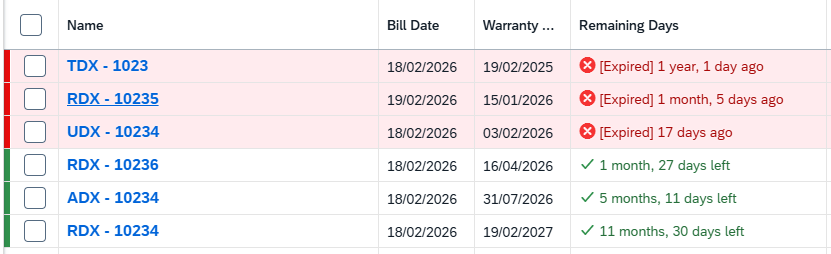
Example Output
Conclusion
Building a Warranty Expiry Calculator requires more than simple date subtraction. Instead, accurate implementations must incorporate calendar logic, leap year validation, and timezone normalization.
By applying these techniques, you ensure:
- Accurate calculations
- Reliable enterprise behavior
- Production-ready implementation
- Long-term system consistency
Ultimately, a well-designed Warranty Expiry Calculator improves reporting accuracy, reduces operational errors, and strengthens system reliability across multi-year durations.